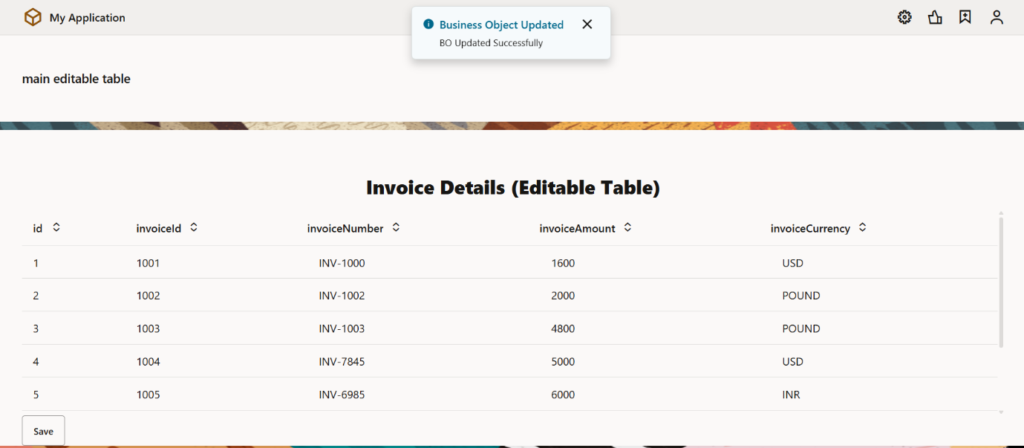
Creating an Editable Table in Oracle VBCS Using Business Objects
Prerequisites
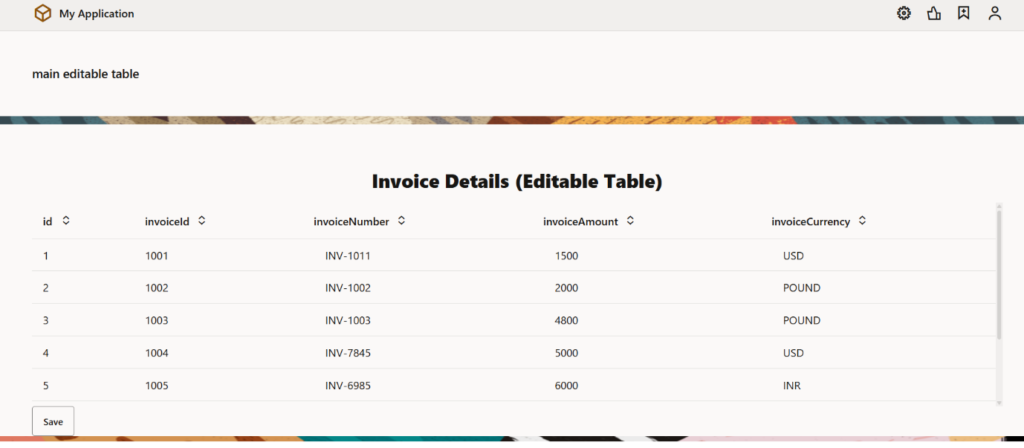
- We have a business object InvoiceBO, the fields in the business object are id, invoiceId, invoiceNumber, invoiceAmount and invoiceCurrency (The invoice data has been imported using an excel file).
- We have a type getInvoiceBOType and the endpoint selected here is GET /businessObjects/getall_InvoiceBO.
- The fields in the type are id, invoiceId, invoiceNumber, invoiceAmount and invoiceCurrency.
- We have two variables one is AP_Invoices_ADP (This variable will hold all invoice records for the table.) which is of the type Array Data Provider and the second variable is myRowVar which is of the type getInvoiceBOType (It temporarily stores the currently edited row during row edit events).
- In the table component we have set the table properties as: go to All → Edit Mode → Row Edit (Row Edit mode enables inline editing of table rows).
Step 1: Bind Table to Data Provider
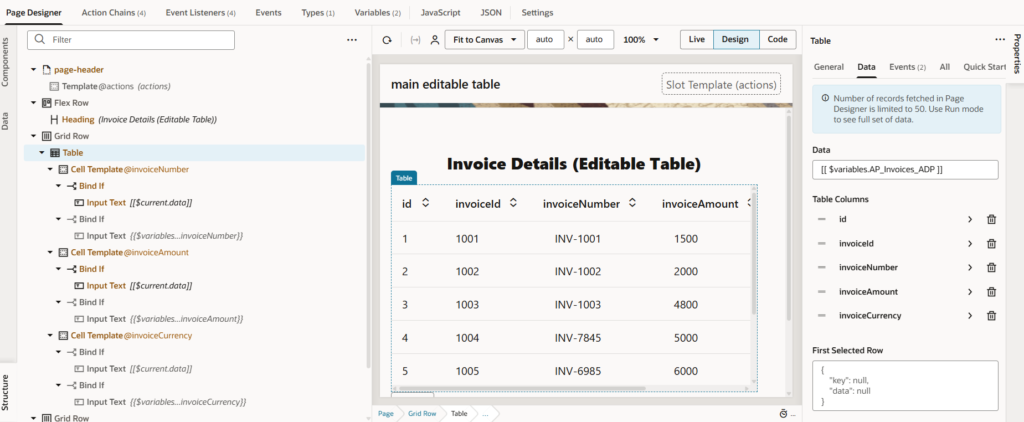
- Select the Table
- Bind Data property to: $variables.AP_Invoices_ADP
Step 2: Design the Editable Table Using Page Designer Logic
Purpose
This step focuses on building the UI and edit behavior of the table using:
- oj-table
- oj-bind-if
- oj-input-text
- Strongly typed variable (myRowVar)
This allows rows to switch cleanly between read-only and edit modes.
2.1 Add Page Header and Title
Use the page header fragment to display the page title.
Code for reference:
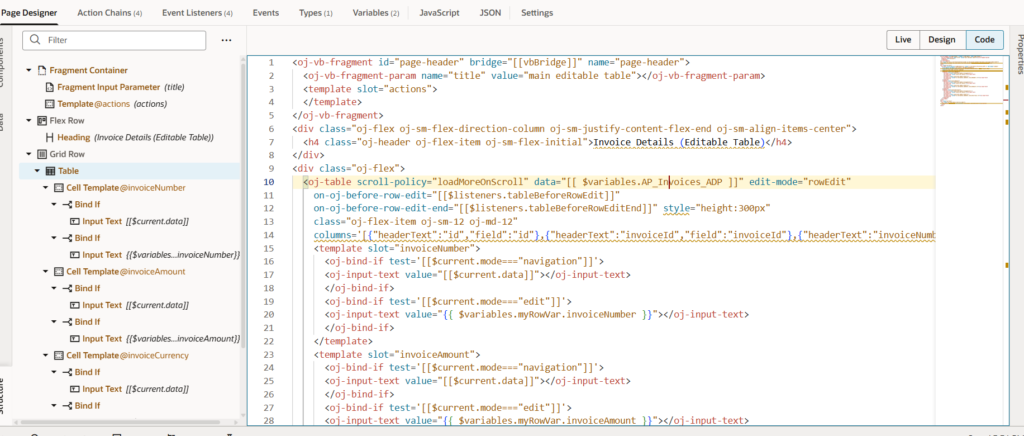
<oj-vb-fragment id=”page-header” bridge=”[[vbBridge]]” name=”page-header”>
<oj-vb-fragment-param name=”title” value=”main editable table”></oj-vb-fragment-param>
</oj-vb-fragment>
(This provides a consistent header across the application.)
2.2 Add Table Container and Heading
Add a heading above the table for clarity.
Code for reference:
<h4 class=”oj-header”>Invoice Details (Editable Table)</h4>
2.3 Configure the oj-table
Add an oj-table and configure it for row-level editing.
Key Properties:
Property Value
data $variables.AP_Invoices_ADP
edit-mode rowEdit
scroll-policy loadMoreOnScroll
height 300px
Code for reference:
<oj-table
data=”[[ $variables.AP_Invoices_ADP ]]”
edit-mode=”rowEdit”
scroll-policy=”loadMoreOnScroll”
on-oj-before-row-edit=”[[$listeners.tableBeforeRowEdit]]”
on-oj-before-row-edit-end=”[[$listeners.tableBeforeRowEditEnd]]”>
2.4 Define Table Columns
Code for reference:
[
{“headerText”:”id”,”field”:”id”},
{“headerText”:”invoiceId”,”field”:”invoiceId”},
{“headerText”:”invoiceNumber”,”field”:”invoiceNumber”,”template”:”invoiceNumber”},
{“headerText”:”invoiceAmount”,”field”:”invoiceAmount”,”template”:”invoiceAmount”}, {“headerText”:”invoiceCurrency”,”field”:”invoiceCurrency”,”template”:”invoiceCurrency”}
]
(Editable columns use templates so we can control view vs edit behavior.)

2.5 Use oj-bind-if for Navigation vs Edit Mode
Why this is needed
- $current.data is read-only
- Editable values must be bound to a typed variable
- This ensures changes are tracked correctly
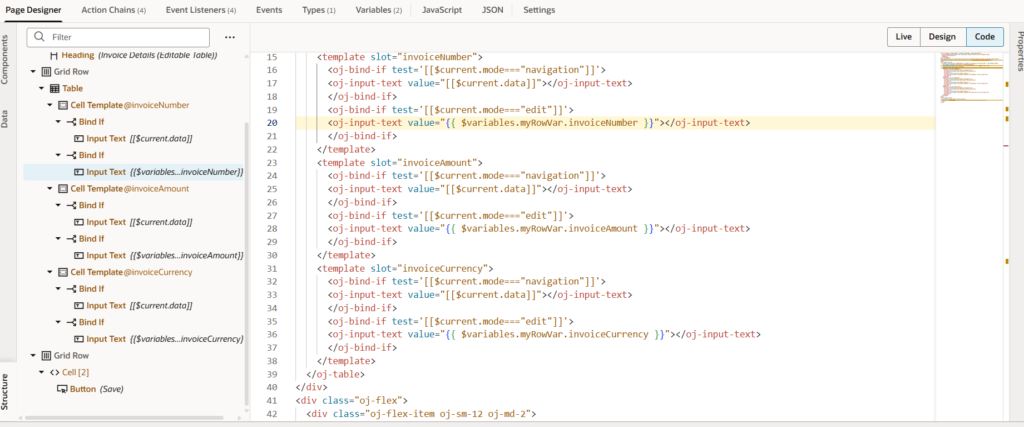
Example: Invoice Number Column
Navigation Mode (Read-only)
Code for reference:
<oj-bind-if test='[[$current.mode===”navigation”]]’>
<oj-input-text value=”[[$current.data]]”></oj-input-text>
</oj-bind-if>
Edit Mode (Editable)
Code for reference:
<oj-bind-if test='[[$current.mode===”edit”]]’>
<oj-input-text value=”{{ $variables.myRowVar.invoiceNumber }}”></oj-input-text>
</oj-bind-if>
Same Pattern for Other Columns
The same logic is applied to:
- invoiceAmount
- invoiceCurrency
Each field is bound to:
$variables.myRowVar.<fieldName>
2.6 Add Save Button
Add a Save button below the table.
<oj-button label=”Save” on-oj-action=”[[$listeners.buttonAction]]”></oj-button>
This button triggers the save logic in ButtonActionChain.
Step 3: Add Event Listeners
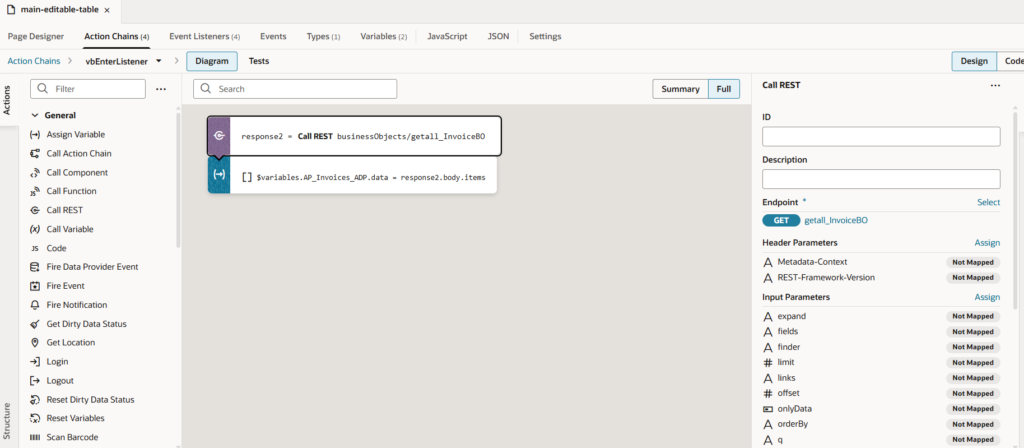
3.1 vbEnter (Page Load)
Purpose: Fetch data when page loads
Action Chain Logic:
- Call REST: GET businessObjects/getall_InvoiceBO
- Assign: $variables.AP_Invoices_ADP.data = response.body.items
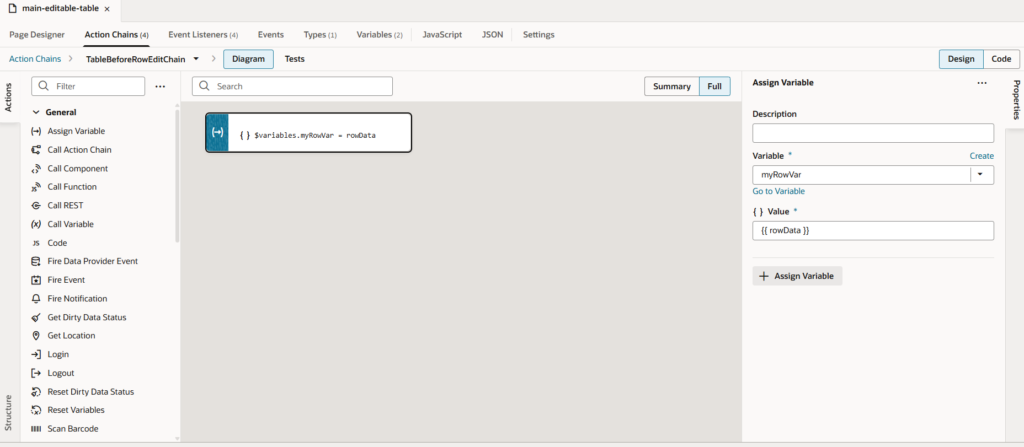
3.2 ojBeforeRowEdit
Purpose: Capture row data before editing starts
Action Chain Logic:
Assign Variable: $variables.myRowVar = rowData
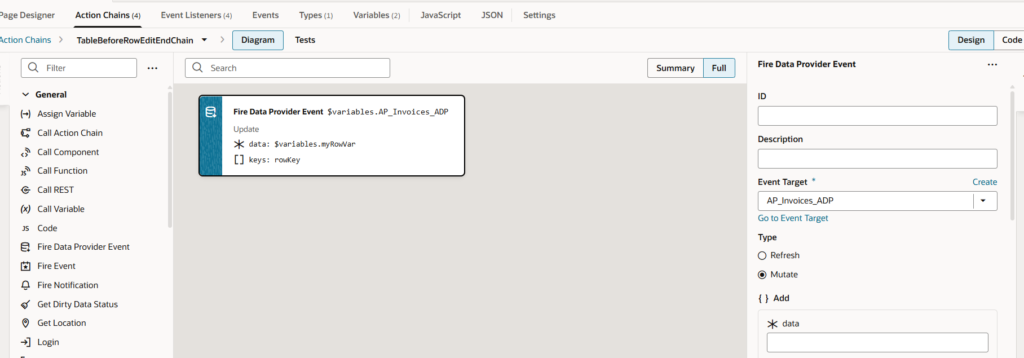
3.3 ojBeforeRowEditEnd
Purpose: This step ensures that edited data is committed back to the Data Provider, so VBCS recognizes it as a change.
Action Chain Logic:
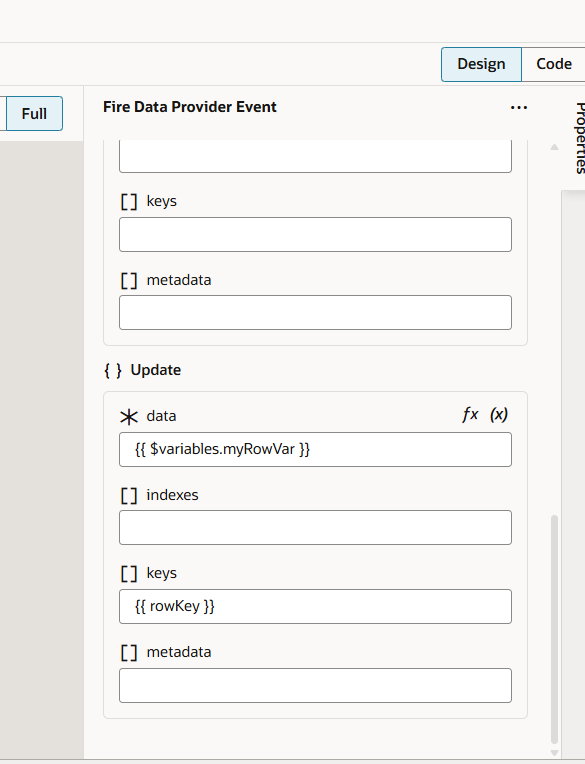
- Add Fire Data Provider Event
- Configure it as follows:
Property Value
Event Target AP_Invoices_ADP
Type Mutate
Data $variables.myRowVar
Keys rowKey
What Happens Internally
- User finishes editing a row
- Data exists in myRowVar
- Data Provider is explicitly mutated
Change is now tracked by VBCS
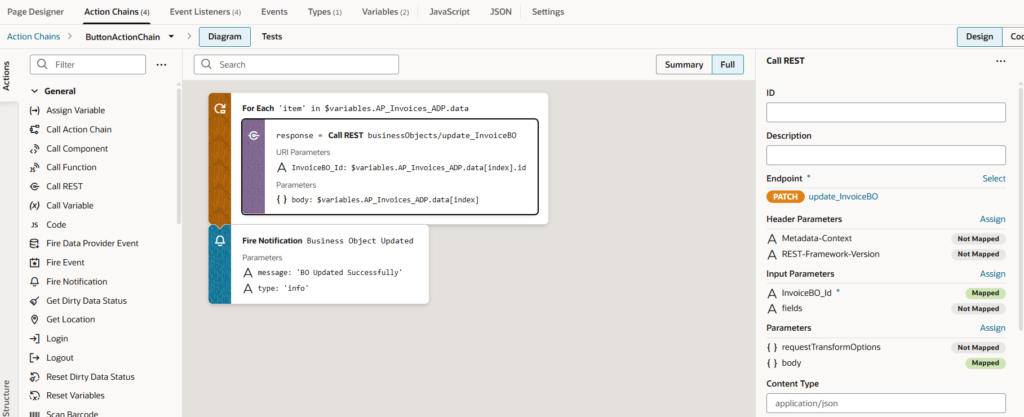
3.4 ojAction (Save Button)
Purpose:
Persist all modified rows to the Business Object using REST API calls.
Action Chain Logic:
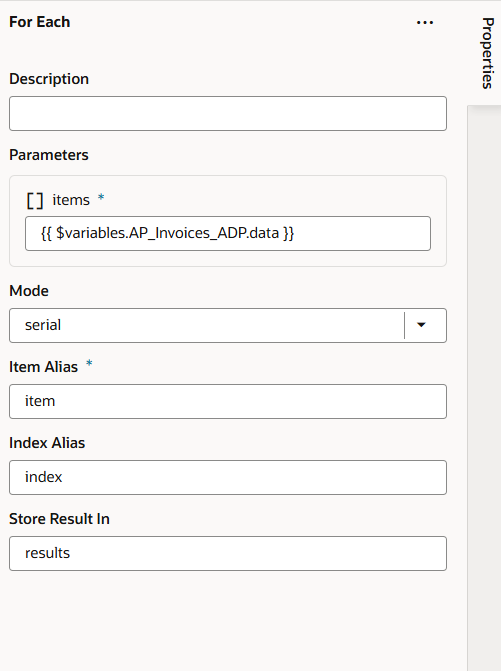
Step 1: Loop Through Table Data
For Each item in $variables.AP_Invoices_ADP.data
Step 2: Call REST – Update Invoice BO
- Endpoint: businessObjects/update_InvoiceBO
- Method: PATCH
Parameter Value
InvoiceBO_Id $variables.AP_Invoices_ADP.data[index].id
Body $variables.AP_Invoices_ADP.data[index]
(This updates each modified invoice record.)
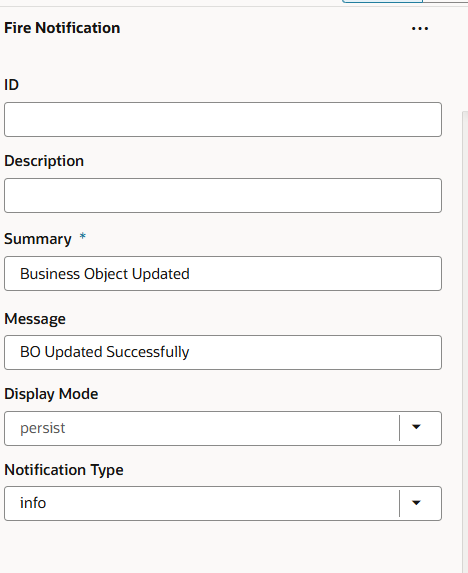
Step 3: Show Success Message
Add Fire Notification:
Message: BO Updated Successfully
Type: info
Final Execution Flow (Editable Table – End-to-End)
- Page Load
- Page loads and calls GET Business Object REST API
- Invoice data is populated into AP_Invoices_ADP
- Table displays invoice records in read-only mode
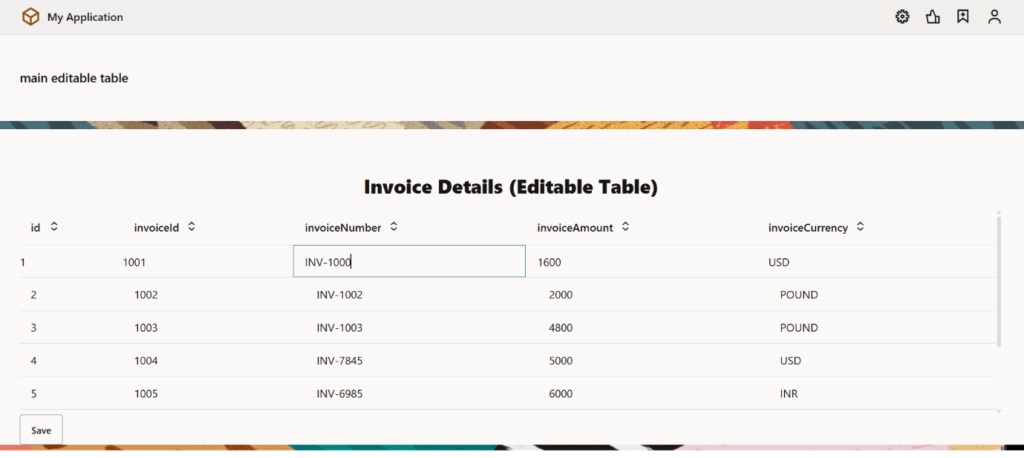
- Row Click (Edit Mode)
- User clicks on a row
- Table enters rowEdit mode
- ojBeforeRowEdit fires
- Selected row data is copied into strongly typed variable myRowVar
- User Edits Data
- User modifies fields like:
- invoiceNumber
- invoiceAmount
- Changes are stored in myRowVar, not directly in the table
- Exit Row Edit
- User clicks outside the row / presses Enter
- ojBeforeRowEditEnd fires
- Mutate event is triggered on AP_Invoices_ADP
- Data Provider is informed that the row has changed
- Save Button Click
- User clicks Save
- Action Chain loops through modified rows
- PATCH REST API is called to update the Business Object
- Business Object Update
- Invoice record is updated successfully in Business Object
- Success notification is shown:
- BO Updated Successfully
- Page Reload / Refresh
- Page reloads or data is fetched again
- Updated values (invoiceNumber, invoiceAmount) are fetched from BO
- Frontend table shows the updated data
Conclusion:
This implementation demonstrates how editable tables in VBCS require strong typing and explicit data provider mutation. By separating navigation and edit modes using oj-bind-if, capturing row data before editing, mutating the data provider on edit end, and finally persisting changes through REST APIs, we ensure a reliable and scalable editable table solution.