Parallel Activity in OIC / Run Parallel process in OIC / Parallel child process in OIC
When building integrations in Oracle Integration Cloud (OIC), we often need to call multiple APIs as part of a single process. If these APIs are called one after another, the overall execution time increases.
To solve this, OIC provides a feature called Parallel Activity, which allows multiple tasks to run at the same time.
In this blog, we will understand what Parallel Activity is, when to use it, and how to implement it with a simple example.
What is Parallel Activity?
Parallel Activity in OIC allows you to execute multiple branches of an integration flow simultaneously.
Instead of waiting for one API call to complete before starting the next, OIC runs them in parallel, which reduces the total processing time.
Each branch performs its own task and once all branches complete, the integration flow continues.
When Should We Use It?
Parallel activity is useful when:
- Multiple APIs need to be triggered with the same data
- The APIs do not depend on each other
- We want to improve performance by reducing wait time
For example, when creating or processing supplier data, different APIs can be called at the same time to fetch or update related information.
Benefits of Parallel Activity:
Using Parallel Activity in OIC provides several advantages:
- Faster execution since APIs run at the same time
- Better performance in integrations involving multiple services
- Cleaner orchestration design
Practical Implementation Example
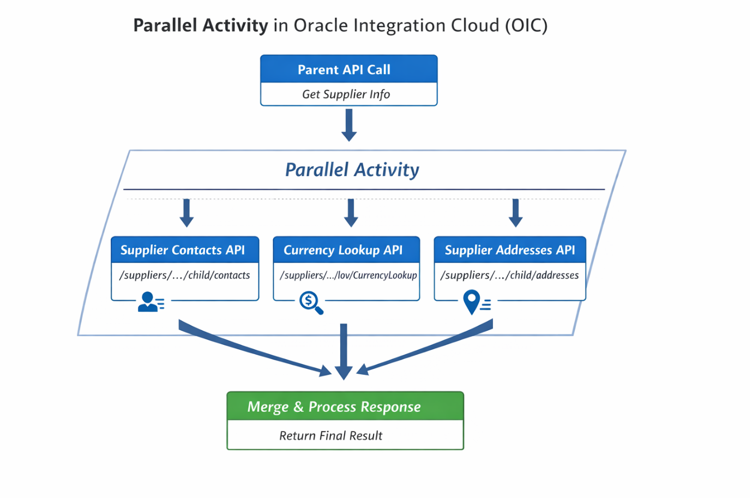
In this example, we create a Parent Integration that first calls a Supplier API. After that, we use Parallel Activity to call three related APIs at the same time.
Step 1: Call Parent Supplier API
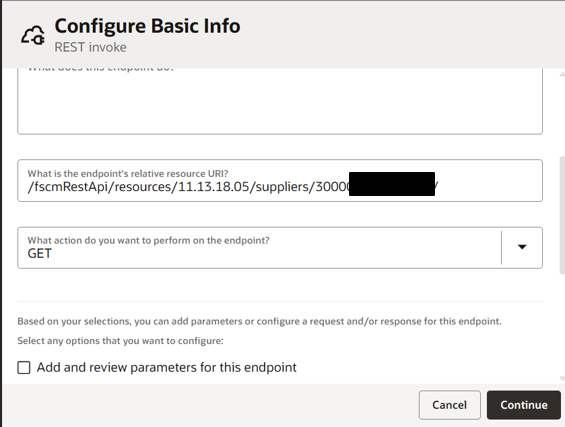
The integration first calls the main supplier API to retrieve supplier information.
Example supplier:
Step 2: Add Parallel Activity
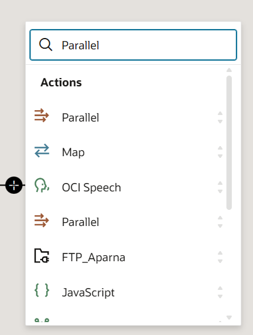
After the parent API call, add a Parallel Activity in the orchestration flow.
Just click on + icon and select parallel activity.
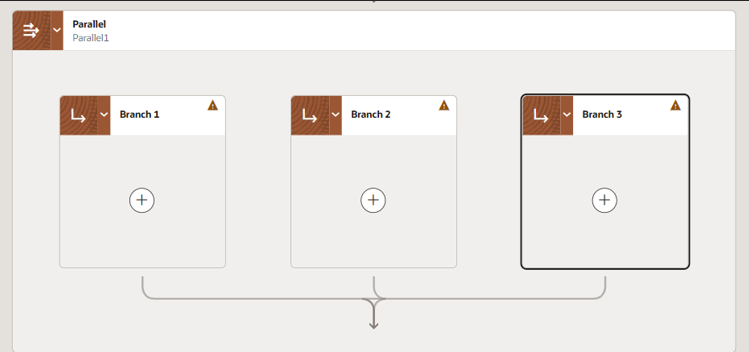
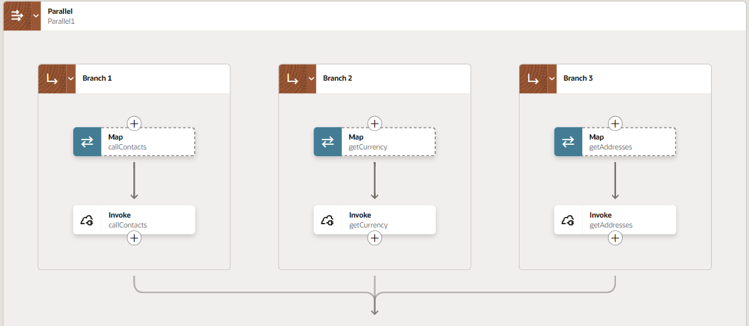
Inside the parallel activity, create three branches where each branch calls a different API.
We can add up to 10 branches.
Step 3: Configure the Three Child APIs
Each branch will call one of the following Oracle Fusion APIs.
Branch 1 – Supplier Contacts API
This API fetches the contact details of the supplier.
/fscmRestApi/resources/11.13.18.05/suppliers/300/child/contacts
Branch 2 – Currency Lookup API
This API retrieves currency related lookup values.
/fscmRestApi/resources/11.13.18.05/suppliers/300/lov/CurrencyLookup
Branch 3 – Supplier Addresses API
This API retrieves the supplier address details.
/fscmRestApi/resources/11.13.18.05/suppliers/300/child/addresses

Step 4: Merge the Flow
Once all three APIs finish execution, the parallel branches merge back into the main integration flow.
At this point, we can process the responses or return the result to the calling system.
Conclusion:
Parallel Activity is a very useful feature in Oracle Integration Cloud when working with multiple independent APIs. Instead of calling APIs sequentially, running them in parallel helps reduce processing time and improves integration efficiency.
In scenarios like supplier data processing, where multiple related APIs such as contacts, addresses, and lookups need to be called, Parallel Activity makes the integration faster and more efficient.